Day 13 of 28 · Vibe Coding Challenge
User Authentication
⏱ 7 min
📊 Intermediate
Authentication is the feature that turns a tool into a product. Once users can sign up and log in, they have their own data, their own settings, their own experience. It's also the feature most people think is too hard to build.
It's not. Not with AI.
What authentication actually means
Authentication answers one question: "Who are you?"
When you log into Netflix, it knows you're you — so it shows your watchlist, your recommendations, your profile. That's authentication.
The components:
Sign up — Create a new account (usually email + password)
Log in — Prove who you are (enter your credentials)
Session — Stay logged in so you don't have to re-enter your password on every page
Log out — End the session
Protected routes — Pages only logged-in users can see (like a dashboard or settings)
Knowledge Check
What's the difference between a page with authentication and one without?
A
There's no practical difference
B
Authenticated pages load faster
C
Authenticated pages have better design
D
Authenticated pages can show personalized content for each user — their data, their settings, their account
Without auth, every visitor sees the same thing. With auth, each user gets a personalized experience — their own data, preferences, and content. That's the foundation of every product from social media to project management tools.
The easy way — third-party auth
You don't need to build authentication from scratch. Services like Supabase Auth, Clerk, and NextAuth handle all the hard parts — password hashing, session management, OAuth, email verification — so you just plug them in.
Add user authentication to my app using Supabase Auth. I need:
- Sign up with email and password
- Log in
- Log out button in the nav bar
- Protect the /dashboard route — redirect to /login if not authenticated
- Show the user's email in the nav bar when logged in
Authentication added ✓
🔐 **Sign up page** (/signup)
- Email + password fields
- "Already have an account? Log in" link
- Error messages for weak passwords and existing accounts
🔑 **Login page** (/login)
- Email + password fields
- "Don't have an account? Sign up" link
- Error message for wrong credentials
🚪 **Logout** — Button in nav bar, clears session
🛡️ **Protected route** — /dashboard redirects to /login if not authenticated
👤 **User email** — Shown in nav bar when logged in
Supabase handles password hashing, session tokens, and security. Try signing up!
↻ Replay conversation
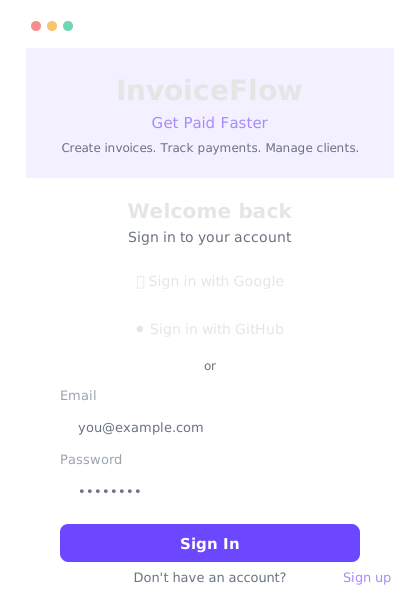
Sign up, log in, social auth — all from one prompt using Supabase Auth.
Knowledge Check
Why use a service like Supabase Auth instead of building authentication yourself?
A
Supabase Auth is faster for users
B
You can't build auth without Supabase
C
Auth has critical security requirements — password hashing, session management, token security — that are easy to get wrong
D
Building it yourself is illegal
Authentication is one of the few things where "good enough" isn't good enough. A single security mistake — storing passwords in plain text, weak session tokens, missing rate limiting — can expose all your users' data. Auth services handle these security requirements so you don't have to.
Social login — "Sign in with Google"
Users hate creating new accounts. Social login lets them sign in with accounts they already have — Google, GitHub, Apple, or others.
Add "Sign in with Google" and "Sign in with GitHub" buttons to the login page. Use Supabase Auth OAuth. Keep the email/password option too. Make the social login buttons look polished — Google and GitHub brand colors and logos.
Social login added ✓
🔵 **Google button** — White background, Google logo, "Sign in with Google"
⚫ **GitHub button** — Dark background, GitHub logo, "Sign in with GitHub"
📧 **Email/password** — Still available below a "or" divider
OAuth flow:
1. User clicks social button
2. Redirected to Google/GitHub to authorize
3. Redirected back to your app, logged in
Supabase handles the OAuth tokens and user creation automatically.
After social login, I want to show the user's avatar from their Google/GitHub profile in the nav bar.
Done ✓ User avatar (from Google/GitHub profile) now shows in the nav bar as a circular image. Falls back to their initials if no avatar is available.
↻ Replay conversation
Knowledge Check
Why do many apps offer "Sign in with Google" instead of only email/password?
A
It's cheaper for the developer
B
It reduces friction — users don't have to create yet another account and password
C
It's required by Google
D
It's more secure than email/password
Every extra step costs users. Creating a new account with a new password is friction. Social login takes one click — users are already signed into Google or GitHub, so they just authorize your app. Less friction = more signups.
What authenticated apps can do
Once you have auth, you unlock these patterns:
Personal dashboards — Each user sees their own data. My tasks, my projects, my settings.
User-generated content — Posts, comments, reviews — all tied to a user account.
Role-based access — Admins see everything. Regular users see only their own data. Viewers can browse but not edit.
Billing and subscriptions — Tie payments to accounts. Free vs. paid features.
Multi-user collaboration — Team workspaces where multiple people work together.
Now that I have auth, update the feature request board from Day 11. Each user should only be able to delete their own feature requests. Show who submitted each request. And users can only vote once per request.
Feature board updated with auth ✓
👤 Each request shows who submitted it (name + avatar)
🗑️ Delete button only appears on your own requests
👍 One vote per user per request (toggleable)
📊 Vote count is accurate — no duplicates
All enforced on the backend — can't be bypassed from the browser.
↻ Replay conversation
Final Check
Why is it important that vote restrictions are "enforced on the backend"?
A
It's a best practice but doesn't matter technically
B
Backend code runs faster
C
Frontend restrictions can be bypassed — anyone can modify browser code. Backend enforcement means the rules can't be cheated
D
The frontend doesn't know who the user is
Anything in the browser can be modified by the user — they can open developer tools and change values. Backend enforcement means the server validates every request. Even if someone tries to cheat, the server rejects invalid votes. Security happens on the backend.
🔐
Day 13 Complete
"Authentication turns visitors into users. Users turn projects into products."
Tomorrow — Day 14
Deploying to the World
Your app works locally. Tomorrow you put it on the internet — live, with a real URL, for anyone to use.