Day 12 of 28 · Vibe Coding Challenge
Databases Made Easy
⏱ 7 min
📊 Intermediate
Every app you use stores data somewhere. Your Instagram photos, your Spotify playlists, your Amazon orders — all sitting in databases. Today you'll learn what databases are and how to add one to your projects without writing a single SQL query yourself.
What is a database?
A database is organized storage for your app's data. Think of it as a collection of spreadsheets:
A table = a spreadsheet (Users, Products, Orders)
A row = one entry (one user, one product, one order)
A column = a property (name, email, price, status)
That's really it. When your app needs to "remember" something — a user's profile, a list of posts, a shopping cart — it reads and writes to the database.
Knowledge Check
What is a database table most similar to?
B
A spreadsheet with rows and columns
A database table works like a spreadsheet. Each column is a property (name, email, price), each row is one record. If you can understand a spreadsheet, you can understand a database.
Databases in vibe coding
Here's the good news: you almost never interact with the database directly. You tell the AI what data you want to store, and it sets up everything — the tables, the connections, the queries.
I'm building a recipe app. I need to store recipes with a title, description, ingredients list, instructions, cooking time, and difficulty level. Users should be able to save their favorite recipes. Set up the database for me.
Database set up ✓
Created two tables:
📋 **recipes**
- id (auto-generated)
- title (text)
- description (text)
- ingredients (JSON array)
- instructions (text)
- cooking_time (minutes)
- difficulty (easy/medium/hard)
- created_at (timestamp)
⭐ **favorites**
- id (auto-generated)
- user_id (links to user)
- recipe_id (links to recipe)
- saved_at (timestamp)
API routes ready:
- GET /api/recipes — list all recipes
- POST /api/recipes — create a recipe
- GET /api/favorites — get user's saved recipes
- POST /api/favorites — save a recipe
The database is connected and ready to use.
↻ Replay conversation
Knowledge Check
In the recipe app example, what did you need to know about databases to set it up?
A
Server configuration and networking
C
Just what data you wanted to store — the AI handled the technical setup
D
Database administration
You described your data in plain English — "recipes with a title, description, ingredients..." — and the AI created the tables, columns, relationships, and API routes. Vibe coding lets you think about what data you need, not how to store it.
The most popular database tools for vibe coding
Supabase — A hosted PostgreSQL database with a beautiful dashboard, built-in auth, and real-time subscriptions. You can see and edit your data through a web interface. The most vibe-coding-friendly database option.
SQLite — A simple file-based database. No server needed. Perfect for prototypes and small apps. AI tools like Bolt use this by default.
Firebase — Google's real-time database. Great for apps that need instant updates (chat, collaboration). Easy to set up but can get expensive at scale.
PlanetScale / Neon — Serverless MySQL/PostgreSQL. Production-grade databases with generous free tiers. Good when you outgrow SQLite.
Using Supabase — the vibe coder's database
Supabase deserves special attention because it's designed for this workflow. Here's how it works:
Set up a Supabase database for a blog platform. I need tables for: posts (title, content, author, published date, slug), comments (post_id, author_name, content, created_at), and tags (name). Posts can have multiple tags. Connect the database and create API routes for all CRUD operations.
Supabase database configured ✓
📝 **posts** table — title, content, author, published_at, slug (unique)
💬 **comments** table — linked to posts via post_id, with author_name and content
🏷️ **tags** table — tag name
🔗 **post_tags** junction table — links posts to tags (many-to-many)
API routes:
- GET/POST /api/posts — list and create posts
- GET /api/posts/:slug — get single post with comments and tags
- POST /api/posts/:id/comments — add comment
- GET /api/tags — list all tags
Supabase dashboard is live — you can view and edit data directly in the browser at your Supabase project URL.
↻ Replay conversation
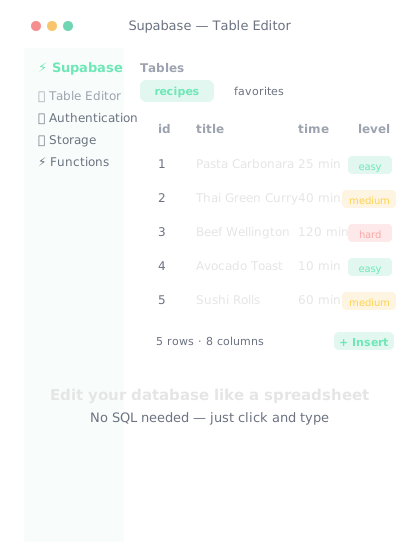
Supabase gives you a spreadsheet-like view of your database. No SQL needed.
Knowledge Check
What makes Supabase especially good for vibe coders?
A
It only works with AI coding tools
B
It has a visual dashboard where you can see and edit your data, plus built-in auth and real-time features
C
It's the cheapest option available
D
It's the fastest database in the world
Supabase gives you a spreadsheet-like interface to see your database. You can add, edit, and delete records visually — no SQL needed. Plus it comes with authentication, file storage, and real-time subscriptions built in. It's the full package for vibe coding.
Data relationships
Most apps have data that's connected. A user has many posts. A post has many comments. A product belongs to a category.
You don't need to understand database theory. Just describe the relationships naturally:
- "Users can create multiple posts"
- "Each post can have comments"
- "Products belong to categories"
- "Users can save recipes to their favorites"
The AI understands these relationships and creates the proper database structure.
I need a database for a project management app. Projects have multiple tasks. Tasks are assigned to team members. Team members can be in multiple projects. Tasks have a status: to-do, in-progress, review, done.
Database structure:
👥 **team_members** — name, email, role, avatar_url
📁 **projects** — name, description, created_by, created_at
🔗 **project_members** — links projects ↔ team_members (many-to-many)
✅ **tasks** — title, description, status, priority, project_id, assigned_to, due_date
Relationships:
- Project has many tasks
- Project has many team members (through project_members)
- Team member can be in many projects
- Task belongs to one project, assigned to one team member
All migrations and API routes created.
↻ Replay conversation
Final Check
How do you tell AI about data relationships when setting up a database?
A
Describe them in plain English — "users can create multiple posts," "tasks are assigned to team members"
B
You can't — databases don't support relationships
C
Write SQL JOIN statements
D
Use formal database notation (ERD diagrams)
Plain English works perfectly. "Users can create multiple posts" tells the AI everything it needs to set up a one-to-many relationship with foreign keys. You describe the real-world relationships, the AI translates them into database structure.
💾
Day 12 Complete
"A database is just organized storage. Describe what you want to remember, and the AI handles the rest."
Tomorrow — Day 13
User Authentication
Tomorrow you'll add user accounts — sign up, log in, and personalized experiences. The stuff that turns a tool into a product.