Day 9 of 14 · Claude Cowork Challenge
Productivity & Research Plugins
⏱ 7 min
📊 Medium
Yesterday you learned what plugins are and how the system works. Today we get hands-on with three plugins that benefit nearly everyone, regardless of role: Productivity, Research, and Enterprise Search.
These three plugins form what you might call the "universal layer" of Cowork's plugin ecosystem. A salesperson needs them. A product manager needs them. An engineer needs them. They solve the problems that cut across every job function — managing your work, finding information, and conducting thorough research.
By the end of today's lesson, you will know how to use each of these plugins effectively and understand when to reach for one versus another.
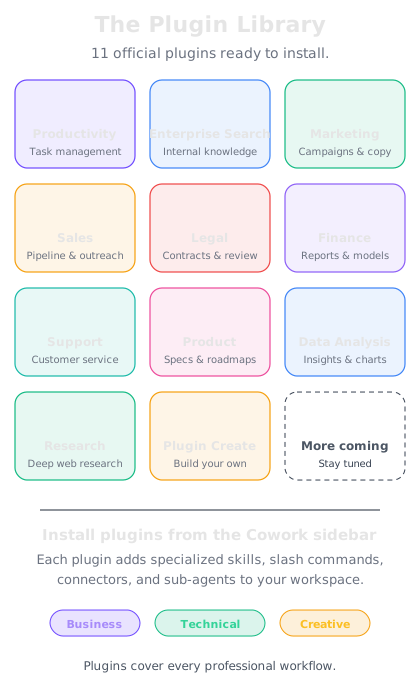
Anthropic's 11 open-source plugins cover the most common knowledge work functions.
The Productivity Plugin
Your Personal Workflow Engine
The Productivity plugin is the closest thing Cowork has to a personal operating system. It covers three core areas:
Task Management — The Productivity plugin can help you organize, prioritize, and track tasks. You can ask Cowork to create task lists from meeting notes, break large projects into subtasks, set priorities, and review what is on your plate. Unlike a traditional task manager, Cowork understands context — it can look at a project brief and generate a realistic task breakdown without you specifying every step.
Calendar Awareness — When connected to your calendar through an MCP connector, Cowork can factor your schedule into its recommendations. It knows when you have back-to-back meetings and should not start a deep-work task. It can help you find open slots for focused work or suggest when to schedule a follow-up.
Personal Context — This is where the Productivity plugin gets powerful. Over time, you can build up a set of personal context files — your preferences, your recurring workflows, your team structure, your project priorities. Cowork uses this context to give you more relevant, personalized assistance without you repeating yourself every session.
The beauty of the Productivity plugin is that it adapts to how you work. Two people can install the same plugin and end up with very different workflows, because the underlying skill files are customizable and the personal context layer is unique to each user.
I just got out of a long strategy meeting and I have a page of messy notes. Can you help me turn these into actionable tasks? Here are my notes: "Need to finalize Q2 budget by Friday. Sarah wants the competitive analysis updated. Website redesign kickoff next week — need to pick an agency. Follow up with Mike about the partnership deal. Customer feedback survey results should be reviewed before Thursday standup."
Here's your task breakdown organized by priority and deadline:
**This Week — Urgent**
- Review customer feedback survey results (before Thursday standup)
- Finalize Q2 budget (by Friday)
**This Week — Important**
- Update competitive analysis (for Sarah — suggest scheduling a check-in with her to confirm scope)
- Follow up with Mike about partnership deal (no deadline given — I'd suggest reaching out today while it's fresh)
**Next Week**
- Website redesign kickoff preparation:
- Research and shortlist 3-4 agencies
- Prepare evaluation criteria
- Draft kickoff meeting agenda
- Schedule agency intro calls
I've broken the website redesign into subtasks since "pick an agency" actually involves several steps. Want me to add estimated time for each task, or help you block time on your calendar for the urgent items?
↻ Replay conversation
The Research Plugin
Deep Dives with Proper Citations
The Research plugin turns Cowork into a thorough research assistant. When you need more than a quick answer — when you need a comprehensive, well-sourced analysis — the Research plugin is your tool.
Here is what makes it different from simply asking Cowork a question:
Structured Research Process — The Research plugin follows a methodical approach: defining the research question, identifying sources, gathering information, synthesizing findings, and presenting results with proper citations. It does not just give you an answer; it shows you where that answer came from.
Citation Tracking — Every claim in a research output is linked back to its source. This is critical for professional work where you need to verify information, share findings with stakeholders, or build on previous research. You get transparency into what Cowork found and where it found it.
Deep Exploration — The Research plugin can spin up sub-agents to explore multiple angles of a topic simultaneously. While one sub-agent investigates market size data, another might be gathering competitor information, and a third could be looking at regulatory considerations. This parallel approach means you get thorough results faster.
Iterative Refinement — Research is rarely a one-shot process. The Research plugin supports follow-up questions, scope adjustments, and deepening exploration of specific areas. You can start broad and narrow down, or start specific and expand outward.
I need to research the current state of the electric vehicle charging infrastructure market in North America. This is for an investment memo, so I need solid data and sources.
I'll conduct a structured research deep dive on the North American EV charging infrastructure market. Here's my research plan:
**Research Scope:**
1. Market size and growth projections (2024-2030)
2. Key players and market share breakdown
3. Technology landscape (Level 2 vs. DC fast charging, standards)
4. Government policy and incentive programs
5. Investment trends and recent funding rounds
6. Infrastructure gaps and growth opportunities
Let me begin the research process. I'll track all sources and provide citations for every data point.
---
*[Research in progress...]*
I've compiled initial findings across all six areas. Here are the highlights with source citations:
**Market Size:** The North American EV charging market was valued at approximately $7.8B in 2025, with projections reaching $35-40B by 2030 (compound annual growth rate of approximately 35%). [Source: industry analyst reports]
**Key Players:** ChargePoint, Tesla Supercharger network, Electrify America, EVgo, and Blink Charging hold the majority of installed stations. Tesla's decision to open its Supercharger network to other manufacturers has reshaped competitive dynamics.
Want me to compile the full research memo with all citations, or should I go deeper on any specific area first?
↻ Replay conversation
The Enterprise Search Plugin
Finding Anything Across Your Company
The Enterprise Search plugin solves one of the most persistent problems in modern organizations: information is scattered across dozens of tools, and finding what you need can take longer than creating it from scratch.
With Enterprise Search, Cowork can search across your connected company tools — your document management system, your project management platform, your communication channels, your knowledge base — and surface relevant information in seconds.
Cross-Platform Search — Instead of opening Slack, then Google Drive, then Confluence, then Notion, you ask Cowork one question and it searches across all connected platforms simultaneously. The MCP connectors handle the integration; you just ask your question in plain language.
Contextual Results — Enterprise Search does not just return a list of links. It reads the relevant documents, synthesizes the information, and gives you an answer with references back to the source documents. If you ask "What was decided about the pricing change in last month's product review?" Cowork will find the meeting notes, the follow-up emails, and the updated pricing document, then give you a clear summary.
Permission-Aware — Enterprise Search respects the access controls of your connected tools. It only searches and surfaces information you have permission to see, maintaining your organization's security boundaries.
The Enterprise Search plugin is especially valuable for new team members who do not yet know where information lives, and for cross-functional projects where relevant context is spread across multiple teams' tools.
Knowledge Check
What are the three core areas the Productivity plugin covers?
A
Email management, file organization, and project planning
B
Task management, calendar awareness, and personal context
C
Note-taking, time tracking, and collaboration
D
Document editing, spreadsheet analysis, and presentations
The Productivity plugin focuses on three core areas: task management (organizing and prioritizing work), calendar awareness (factoring your schedule into recommendations), and personal context (building up preferences and recurring workflows for personalized assistance).
Knowledge Check
What distinguishes the Research plugin from simply asking Cowork a question?
A
It requires a paid subscription to external research services
B
It follows a structured process with citation tracking and source transparency
C
It can only be used for scientific topics
D
It only searches academic databases
The Research plugin follows a methodical research process — defining questions, identifying sources, gathering information, and synthesizing findings — with full citation tracking. Every claim is linked back to its source, providing the transparency needed for professional work.
Knowledge Check
How does the Enterprise Search plugin handle information across multiple company tools?
A
It requires you to search each tool separately and combines the results
B
It uses MCP connectors to search across connected platforms simultaneously
C
It copies all company data into a local database for searching
D
It only works with tools that have built-in AI search capabilities
The Enterprise Search plugin uses MCP (Model Context Protocol) connectors to integrate with your company's tools and search across all connected platforms simultaneously. You ask one question in plain language, and Cowork searches everywhere at once.
Knowledge Check
Why is the Enterprise Search plugin especially valuable for new team members?
A
They don't yet know where information lives across the organization's tools
B
It connects them with mentors on the team
C
It gives them elevated access permissions temporarily
D
It provides onboarding training materials automatically
New team members often struggle because they don't know which tool holds which information. Enterprise Search eliminates this problem by searching across all connected platforms, so the new team member doesn't need to know where things are stored — they just ask their question.
🔍
Day 9 Complete
"The Productivity, Research, and Enterprise Search plugins form your universal toolkit — managing your work, finding deep answers, and surfacing information from across your organization."
Tomorrow — Day 10
Sales & Marketing Plugins
Learn how the Sales and Marketing plugins help you close deals and launch campaigns with AI-powered workflows.