Day 24 of 28 · Vibe Coding Challenge
SEO and Analytics
⏱ 6 min
📊 Intermediate
You built it. You deployed it. But if nobody can find it, does it matter? Today you'll learn SEO (getting found on Google) and analytics (understanding your users). Both are essential for turning a project into a product.
SEO — getting found on Google
SEO (Search Engine Optimization) is how you get your app to show up when people search for related topics. It's not magic — it's a checklist of things Google looks for.
The three pillars:
Technical SEO — Your site loads fast, works on mobile, and is structured so Google can read it.
On-page SEO — Your pages have clear titles, descriptions, headings, and relevant content.
Content — You have useful pages that answer questions people are searching for.
Knowledge Check
What is SEO?
A
A social media marketing strategy
B
A type of advertising you pay for
C
A way to make your website faster
D
Optimizing your website so it appears higher in search engine results — helping people find you organically
SEO is about making your site discoverable through search engines like Google. When someone searches "invoicing tool for freelancers" and your app appears on the first page, that's SEO working. It's free traffic — no ads required.
The SEO audit prompt
One prompt can handle most of your SEO needs:
Add SEO optimization to my landing page. Include:
- Proper meta title and description
- Open Graph tags for social sharing
- Semantic HTML (proper heading hierarchy)
- Sitemap.xml
- Robots.txt
- Schema.org structured data for a SaaS product
- Alt text on all images
- Canonical URLs
SEO optimization complete ✓
🏷️ **Meta tags**
- Title: "InvoiceFlow — Simple Invoicing for Freelancers"
- Description: "Create professional invoices, track payments, and manage clients. Free to start."
📱 **Open Graph tags** — Proper preview when shared on Twitter, LinkedIn, and Facebook
📋 **Semantic HTML** — h1 → h2 → h3 hierarchy, proper section/nav/main tags
🗺️ **sitemap.xml** — Auto-generated with all public pages
🤖 **robots.txt** — Allows all crawlers, points to sitemap
📊 **Schema.org** — SoftwareApplication structured data with pricing, rating fields
🖼️ **Image alt text** — Descriptive alt text on all 8 images
🔗 **Canonical URLs** — Set on all pages to prevent duplicate content issues
↻ Replay conversation
Knowledge Check
What are Open Graph tags for?
A
Making the site work offline
B
Improving page load speed
D
Controlling how your page looks when shared on social media — the title, description, and preview image
When someone shares your link on Twitter, LinkedIn, or Facebook, Open Graph tags control what preview appears — the title, description, and image. Without them, social platforms display a generic or ugly preview. With them, your links look professional and clickable.
Analytics — understanding your users
You need to know: Who's visiting? Where are they coming from? What are they doing? Are they signing up?
Google Analytics is the standard, but it's complex. For vibe coders, simpler tools work better:
Plausible — Privacy-friendly, simple analytics. One script tag, clean dashboard. No cookie banners needed.
PostHog — Analytics plus feature flags, session recording, and A/B testing. Open source.
Vercel Analytics — Built into Vercel. Zero setup if you deploy there. Shows page views, top pages, and geographic data.
Add Plausible analytics to my Next.js app. I also want to track custom events: when users sign up, when they create an invoice, and when they upgrade to a paid plan.
Analytics added ✓
📊 **Plausible script** — Added to the app layout, loads on every page
📈 **Custom events tracked:**
- "Signup" — fires after successful registration
- "Invoice Created" — fires when user creates a new invoice
- "Plan Upgraded" — fires when user completes Stripe checkout
All events show up in your Plausible dashboard.
↻ Replay conversation
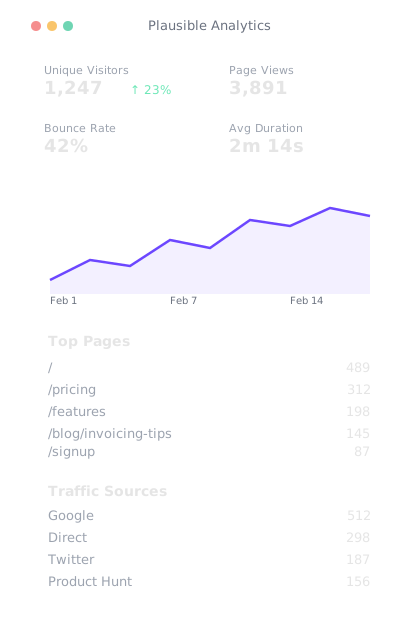
Clean analytics — visitor trends, top pages, traffic sources. No cookie banners needed.
You can see:\n- Total signups per day/week/month\n- Conversion rate from visitor → signup → paying customer\n- Which pages drive the most signups
Knowledge Check
Why track custom events like "Invoice Created" and "Plan Upgraded"?
A
To slow down the website
B
Custom events are required by analytics tools
C
To show off on social media
D
To understand user behavior — how many sign up, how many use the product, how many pay. This tells you where users drop off
The journey from visitor to paying customer has stages: visit → sign up → use the product → pay. Tracking each stage shows you where people drop off. If 1000 people visit but only 5 sign up, your landing page needs work. If 100 sign up but only 2 pay, your product or pricing needs work.
The metrics that matter
Don't drown in data. Focus on these five metrics:
Visitors — How many people are coming to your site? Is the number growing?
Sign-up rate — What percentage of visitors create an account? (Good: 2-5%)
Activation rate — What percentage of signups actually use the product? (They create their first invoice, post, or project)
Conversion rate — What percentage of active users become paying customers?
Churn rate — What percentage of paying customers cancel each month? (Keep this under 5%)
These five numbers tell you the health of your entire business.
Knowledge Check
If your landing page gets 1000 visitors but only 10 sign up, what does that tell you?
B
Your landing page isn't converting — the messaging, design, or offer needs improvement
C
Your analytics are broken
A 1% signup rate suggests the landing page isn't compelling enough. The visitors arrived (so your traffic source works), but they left without signing up. This means you need to improve your headline, clarify your value proposition, or add social proof. The product itself might be great — it's the sales pitch that needs work.
SEO content strategy
The most effective SEO strategy for a new product: write articles that answer questions your target users are searching for.
For an invoicing app, that might be:
- "How to write a freelance invoice"
- "Invoice templates for designers"
- "When to charge late fees on invoices"
Each article brings Google traffic to your site. Each reader is a potential user. It's free, sustainable, and compounds over time.
Final Check
What's the most sustainable way to get users for your SaaS product?
A
Waiting for word of mouth
B
Cold emailing thousands of people
C
Paid advertising on every platform
D
SEO and content — create useful content that ranks on Google, bringing ongoing free traffic
SEO is the only traffic source that compounds. An article that ranks on Google brings traffic forever — not just the day you publish it. Ads stop working when you stop paying. SEO keeps working indefinitely. It's the best long-term investment for a new product.
📊
Day 24 Complete
"Build it, measure it, improve it. SEO brings them in, analytics tells you what to fix."
Tomorrow — Day 25
Security Essentials
Your app is live and growing. Tomorrow you'll learn the security basics that protect your users and your reputation.