Day 3 of 28 · Vibe Coding Challenge
How AI Understands Code
⏱ 5 min
📊 Beginner
You don't need to understand how a car engine works to drive. But knowing the basics — gas makes it go, brakes make it stop — makes you a better driver.
Same with AI code generation. Understanding how it works makes you dramatically better at using it. Today you'll learn just enough to level up your prompting.
Trained on the world's code
AI coding models like Claude and GPT-4 were trained on billions of lines of code — open-source projects, documentation, tutorials, Stack Overflow answers, blog posts, and more.
They don't "memorize" code. They learn patterns. They understand that a React component has a certain structure, that a Python function follows certain conventions, that an API endpoint needs certain parts.
When you ask for code, the AI isn't copy-pasting from a database. It's generating new code based on patterns it's learned — like how you can write a new sentence even though you learned language from reading other people's sentences.
Knowledge Check
How does an AI model generate code?
A
It searches a database and copy-pastes matching code
B
It memorizes specific code files and recalls them
C
It connects to GitHub and downloads relevant repositories
D
It generates new code based on patterns learned from training on billions of lines of code
AI models learn patterns, not specific code. They understand the structure and conventions of different languages and frameworks, then generate new code that follows those patterns — just like you form new sentences from language patterns you've learned.
Context is everything
Here's the single most important thing to understand about AI code generation: the AI generates the next most likely token based on everything that came before it.
"Token" just means a piece of text — roughly a word or part of a word. The AI reads your prompt, the conversation history, and any code you've shared, then predicts what should come next, one token at a time.
This means:
More context = better code. If you tell the AI about your project structure, tech stack, and existing code, it writes code that fits perfectly.
Vague prompts = generic code. If you just say "make a website," you'll get something generic. If you say "make a Next.js landing page with Tailwind CSS, a hero section with gradient text, and a feature grid with icons," you'll get exactly that.
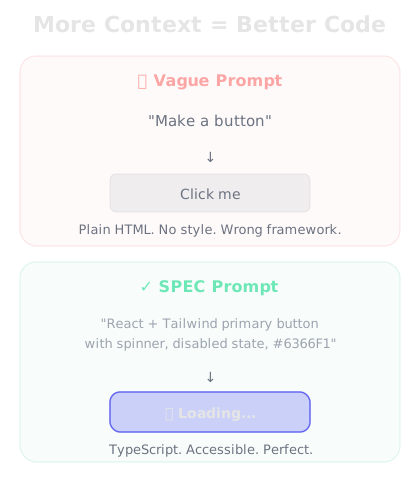
Same AI. Same model. The only difference is context.
Here's a basic HTML button:
`<button>Click me</button>`
Would you like me to add styling or functionality?
Make a primary action button for a SaaS dashboard built with React and Tailwind CSS. It should have a loading state with a spinner, be disabled while loading, and use our brand color #6366F1.
Here's your button component:
✅ React component with TypeScript
✅ Tailwind CSS styling with your brand color (#6366F1)
✅ Loading state with animated spinner
✅ Disabled state while loading
✅ Hover and focus states
✅ Accessible (proper aria attributes)
The component accepts `onClick`, `loading`, `disabled`, and `children` props. Drop it anywhere in your dashboard.
↻ Replay conversation
Knowledge Check
Why did the second prompt produce dramatically better results?
A
The AI model was upgraded between the two prompts
B
The second prompt gave specific context — framework, styling, behavior, and brand requirements
C
The AI tried harder on the second attempt
D
The second prompt used magic keywords
Same AI, same model. The only difference was context. The specific prompt told the AI exactly what framework, styling system, behavior, and design constraints to follow. More context = better code. Every time.
The context window
AI models have a context window — the amount of text they can "see" at once. Think of it as the AI's working memory.
Modern models have large context windows (100K–200K tokens), which means they can read and understand entire codebases. This is why tools like Cursor can understand your whole project — they feed your code into the context window so the AI knows what it's working with.
When the context fills up, older parts of the conversation get pushed out. That's why long conversations can sometimes feel like the AI "forgot" what you discussed earlier.
Knowledge Check
What happens when a conversation gets very long and fills the context window?
A
The AI switches to a more powerful model
B
Older parts of the conversation may get pushed out, causing the AI to "forget" earlier context
D
The conversation automatically saves to a database
The context window is finite. When it fills up, older messages get dropped. This is why it's sometimes better to start a new conversation for a new feature rather than continuing a very long one — you get a fresh, full context window.
Why this matters for you
You don't need to understand transformer architectures or attention mechanisms. But these three concepts will make you a dramatically better vibe coder:
1. Be specific. The more context you give, the better the code. Don't say "make a form" — say "make a contact form with email validation, a character counter on the message field, and a success toast notification."
2. Share your codebase. Use tools that can see your entire project. Isolated code snippets lead to inconsistent code.
3. Start fresh when needed. If the AI seems confused after a long conversation, start a new chat. A fresh context window means a clear head.
Final Check
Which of these habits will make you the most effective vibe coder?
A
Never sharing your existing code with the AI
B
Using the shortest possible prompts to save time
C
Always continuing the same conversation, no matter how long it gets
D
Being specific in your prompts and giving the AI as much relevant context as possible
Specificity and context are your superpowers. The AI can only be as good as the information you give it. Clear requirements + relevant context = code that works the first time.
🧠
Day 3 Complete
"The AI isn't magic — it's pattern matching on steroids. Give it better patterns, get better code."
Tomorrow — Day 4
Setting Up Your Environment
Time to get your hands dirty — we'll install and configure the tools you'll use throughout this challenge.