What Is ChatGPT?
In November 2022, OpenAI released a chatbot that changed everything. Within five days, it had one million users. Within two months, it had one hundred million. No technology in history had been adopted that fast.
That chatbot was ChatGPT — a conversational AI that can write, reason, research, code, analyze data, generate images, hold voice conversations, and even create video. It's built on top of OpenAI's large language models, trained on a massive portion of human knowledge.
Today you'll learn what ChatGPT actually is, what it can do in 2026, and how to think about it as a tool that fits into your daily life and work.
So what is ChatGPT, really?
At its core, ChatGPT is a conversational AI assistant. You type (or speak) a message, and it responds. But unlike a search engine that returns a list of links, ChatGPT gives you a direct, conversational answer — and it remembers what you've said earlier in the conversation so it can build on context.
Think of it less like a search bar and more like a brilliant colleague who has read most of the internet, can write in any style, and never gets tired.
Here's what makes it different from what came before:
It understands context. You can have a back-and-forth conversation. Ask a follow-up question, and it knows what you're referring to.
It generates original content. It doesn't copy-paste from websites. It synthesizes information and creates new text, code, images, and more.
It adapts to you. Tell it to write formally, casually, or like a pirate — it adjusts. Give it your preferences, and it remembers them across conversations.
The models powering ChatGPT in 2026
ChatGPT isn't just one thing — it's powered by different AI models, each with different strengths. When you open ChatGPT, you choose which model to use:
GPT-5.2 Instant — The default mode. Fast, capable, and great for everyday tasks like writing, summarizing, brainstorming, and answering questions. Responses come back in seconds.
GPT-5.2 Thinking — The same powerful model, but it takes extra time to "think" before responding. It breaks down complex problems step by step. Best for math, logic, analysis, and anything that benefits from careful reasoning.
o3 — OpenAI's dedicated reasoning model. Built specifically for problems that require deep, multi-step reasoning — advanced math, scientific analysis, complex coding challenges. It's slower but remarkably thorough.
You don't need to understand the technical details. Just know this: for most tasks, GPT-5.2 Instant is perfect. When something requires deeper thinking, switch to Thinking mode or o3.
What can ChatGPT actually do?
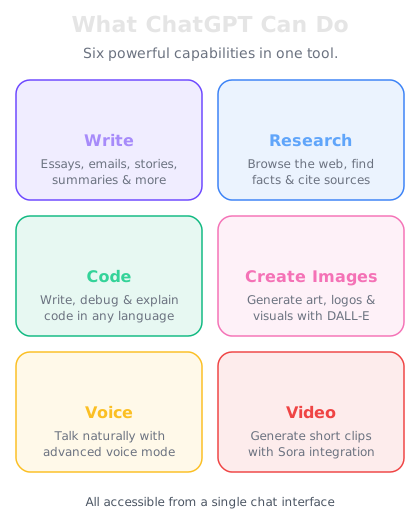
Here's a non-exhaustive list of what ChatGPT can do today:
Writing & Communication — Draft emails, articles, reports, social media posts, cover letters, scripts, essays, and creative fiction. Edit and rewrite existing text. Translate between languages.
Research & Analysis — Summarize long documents, explain complex topics, compare options, analyze data in spreadsheets, and browse the web for real-time information.
Coding & Technical Work — Write code in dozens of languages, debug errors, explain how code works, build entire applications, and create technical documentation.
Image Generation — Create original images from text descriptions. Design logos, illustrations, social media graphics, product mockups, and more using DALL-E integration.
Voice Conversations — Talk to ChatGPT out loud using Advanced Voice mode. It can listen, understand, and respond with natural-sounding speech in real time.
Video — Generate short video clips from text prompts using Sora integration, available on higher-tier plans.
Data & Files — Upload PDFs, spreadsheets, images, and code files. ChatGPT can read, analyze, and transform them.
ChatGPT plans — which one is right for you?
OpenAI offers several plans to fit different needs and budgets:
Free — Access to GPT-5.2 Instant with generous daily limits. Includes basic image generation, file uploads, and web browsing. Supported by occasional ads. This is a great starting point.
Go ($5-8/month) — Ad-free experience with higher usage limits than Free. Access to GPT-5.2 Instant and limited access to Thinking mode. Good for regular personal use.
Plus ($20/month) — The sweet spot for power users. Full access to GPT-5.2 Instant and Thinking modes, o3, DALL-E image generation, Advanced Voice, file analysis, and priority access during peak times. This is what most serious users choose.
Pro ($200/month) — Unlimited access to everything, including the highest-capability models, Sora video generation, and extended context windows. Built for professionals who use ChatGPT heavily every day.
Our recommendation: Start with the Free plan today. It's more capable than you might expect. Once you find yourself bumping against limits, upgrade to Plus — it unlocks the full experience.