Day 15 of 20 · AI for Teachers
Parent Communication with AI
⏱ 7 min
📊 Beginner
Parent emails are one of those invisible time sinks that nobody talks about in teacher training. A quick "progress update" turns into 20 minutes of careful wording. A behaviour concern email gets rewritten three times because you're terrified of how it'll land. And the dreaded angry parent reply? That can derail your entire evening.
Today you'll learn to use AI to draft parent communications that are warm, professional, and parent-friendly — in a fraction of the time it usually takes.
The four emails every teacher writes
Almost every parent communication falls into one of four categories:
Positive updates — Sharing good news about a child's progress, effort, or achievement. These are the emails you want to send but often don't because you're too busy putting out fires.
Behaviour concerns — The emails you dread writing. One wrong word and you've got an angry phone call. Too soft and nothing changes. Too blunt and you've damaged the relationship.
Meeting invitations — Parents' evenings, SEN reviews, behaviour meetings. These need to be clear, professional, and warm enough that the parent actually shows up.
Progress reports — End-of-term or mid-year updates that summarise a child's learning. These take forever when you've got 30 to write.
AI can help with every single one of these — and it can do it in your voice, at your school's tone, in under a minute.
Knowledge Check
Why are behaviour concern emails particularly difficult for teachers to write?
A
Because teachers aren't trained in writing
B
The tone has to strike a balance — firm enough that the issue is clear, but warm enough to maintain the parent relationship
C
Because behaviour policies are always changing
D
Because parents don't read emails
Behaviour emails are a tightrope walk. Too harsh and the parent gets defensive. Too gentle and the concern gets lost. AI helps you find that balance quickly because you can iterate on the tone in seconds rather than agonising over every sentence.
Translating teacher-speak into parent-friendly language
Teachers live in a world of jargon. "Working towards expected standard," "metacognitive strategies," "retrieval practice," "zone of proximal development." We know exactly what these mean. Parents often don't — and when they don't understand, they either switch off or worry.
Here's the shift: instead of dumbing things down, you're translating expertise into plain English. The information stays the same. The language becomes accessible.
Teacher-speak: "Jake is working towards the expected standard in reading and needs to develop his inference skills using retrieval-based strategies."
Parent-friendly: "Jake is making progress with his reading. The next step for him is being able to read between the lines — understanding what the author means rather than just what they say. Practising this at home with his reading book would really help."
Same message. One version builds understanding. The other builds confusion.
Knowledge Check
What's the goal when translating teacher-speak for parents?
A
Keep the same information but express it in everyday language that parents can understand and act on
B
Remove all detail so parents don't worry
C
Use more formal language to sound authoritative
D
Avoid mentioning anything negative
Parents want to understand how their child is doing and what they can do to help. When you strip out the jargon and explain things in plain English, parents feel informed rather than intimidated — and they're far more likely to support you at home.
Templates that save you hours
Here's a prompt structure that works for any parent email:
"You are a [primary/secondary] school teacher writing to a parent. The tone should be warm, professional, and clear — avoid educational jargon. The child's name is [name]. Write a [type of email] about [topic]. Keep it under [length]. End with a clear next step or invitation to respond."
For positive updates, add: "Highlight specific examples of what the child did well."
For behaviour concerns, add: "Be honest but compassionate. Frame the concern around helping the child succeed, not criticising them."
For progress reports, add: "Include one strength, one area for development, and one practical thing the parent can do at home."
Save these as templates. When you need an email, fill in the blanks and let AI draft it. You'll go from 20 minutes per email to 2 minutes of editing.
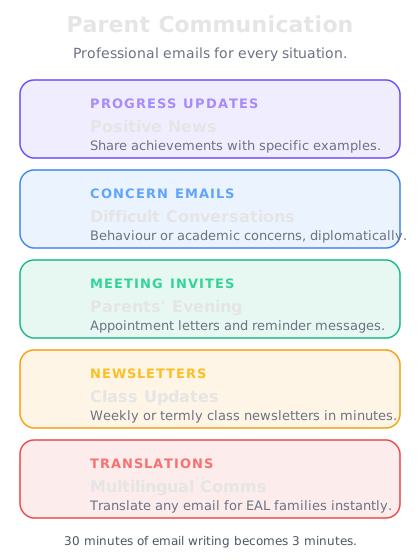
One prompt structure, four email types. Save it as a template and you'll never stare at a blank email again.
Handling the angry parent email
Every teacher knows the feeling. You open your inbox and there it is — a wall of text from a parent who's upset, accusatory, and sometimes outright rude. Your heart rate spikes. You want to fire back. You know you can't.
Here's where AI becomes your emotional buffer. Instead of drafting a response while you're flustered, paste the parent's email into ChatGPT with this prompt:
"A parent has sent me this email [paste email]. They're clearly upset. I need to respond professionally and empathetically. Acknowledge their concern, avoid being defensive, address the specific issue, and suggest a next step (like a phone call or meeting). Keep the tone calm, warm, and solution-focused."
The AI doesn't get emotional. It doesn't take things personally. It gives you a solid first draft that you can refine once you've calmed down. That 30-minute spiral of "How do I word this?" becomes a 5-minute edit.
Knowledge Check
Why is AI particularly useful for responding to angry parent emails?
A
Because you can blame the AI if the parent gets more upset
B
It acts as an emotional buffer — drafting a calm, professional response while you process the situation, so you don't reply reactively
C
Because AI automatically forwards angry emails to your headteacher
D
Because AI responses sound robotic and that calms parents down
When emotions run high, writing quality drops. AI gives you a measured, professional starting point — so instead of replying while flustered, you're editing a calm draft. The response is still yours. The tone is just better because you didn't write it in the heat of the moment.
I'm a Year 5 teacher. A parent has emailed me this:
"I'm really unhappy with how my daughter Amira has been treated. She says she's been moved seats away from her friends AGAIN and she's coming home upset every night. I don't think this is fair and I want to know why this keeps happening. I'm considering raising this with the headteacher."
I moved Amira because she was chatting constantly and not completing her work. I need to respond professionally. Acknowledge the parent's concern, explain my reasoning without being defensive, and suggest we meet to discuss it.
Here's your draft:
---
Dear Mrs Ahmed,
Thank you for getting in touch — I really appreciate you letting me know how Amira is feeling, and I'm sorry to hear she's been upset.
I completely understand how it must look from Amira's perspective, and her feelings are absolutely valid. I want to reassure you that the seating change wasn't a punishment — I regularly adjust seating in the classroom to help all children stay focused and do their best work. In Amira's case, I noticed she was finding it harder to concentrate in her previous seat, and I wanted to give her the best chance of showing what she's capable of.
I can see this has had an impact on her, and I'd really like to work together to find a solution. Would you be available for a quick meeting this week — either in person or over the phone? I'd love to chat through how we can make sure Amira feels happy and supported while also helping her focus in class.
Please let me know what works for you.
Warm regards,
[Your name]
---
This acknowledges the parent's concern without being defensive, explains the reasoning positively, and moves toward a collaborative solution. Want me to adjust the tone?
That's great. Make it slightly more concise — this parent will respond better to shorter emails.
Here's the shorter version:
---
Dear Mrs Ahmed,
Thank you for letting me know — I'm sorry to hear Amira's been upset.
The seating change wasn't a punishment. I regularly adjust seats to help children focus, and I wanted to set Amira up to do her best work. I can see it's affected her though, and I'd like to find a solution together.
Would you be free for a quick chat this week? I'd love to talk it through.
Warm regards,
[Your name]
---
Same message, half the length. Shall I save this as a template for future parent concern responses?
↻ Replay conversation
Progress reports at scale
End-of-term reports are the task every teacher dreads. Thirty personalised reports, each needing to sound individual, each taking 15-20 minutes. That's 10 hours of report writing — often done in evenings and weekends.
Here's how AI changes this. Create a master prompt with your report structure, then feed in brief notes about each child:
"Write a Year 5 end-of-term report for [child's name]. They are [ability level] in [subject]. Strengths: [list]. Areas to develop: [list]. Behaviour/attitude: [brief note]. Write in a warm, encouraging tone. Include one specific example and one target for next term. Keep it to 150 words."
You provide 30 seconds of bullet points per child. AI drafts a 150-word report in 15 seconds. You edit for 2-3 minutes. Total time per report: under 4 minutes instead of 20. That's your entire set of reports done in 2 hours instead of 10.
Final Check
How does using AI for report writing maintain personalisation despite being faster?
A
AI automatically knows every child in your class
B
It doesn't — all the reports sound the same
C
You provide specific notes about each child — their strengths, areas to develop, and examples — so AI generates genuinely individual reports from your observations
D
You copy and paste the same report and change the name
The personalisation comes from your professional knowledge of each child. You provide the insights — AI handles the writing. Because you're feeding in unique information for each child, the output is genuinely individual. You're not outsourcing your expertise, you're outsourcing the time-consuming act of turning your notes into polished prose.
📚
Day 15 Complete
"AI doesn't write your parent emails for you — it writes the first draft so you can focus on the relationship, not the wording."
Tomorrow — Day 16
Assemblies & Presentations
Tomorrow you'll use AI to generate assembly scripts, presentation content, and CPD session outlines in minutes.