Your AI Toolkit for Sales
Yesterday you learned that AI can give you 10+ extra selling hours every week. Today you're going to set up the actual tools that make it happen.
You don't need expensive software. You don't need your company to buy anything. Three free (or freemium) AI tools cover 90% of what a sales rep needs — and you can be up and running in under 15 minutes.
Let's build your toolkit.
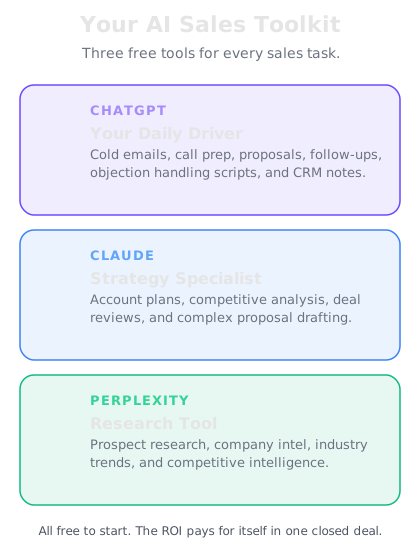
Tool 1 — ChatGPT for emails, scripts, and daily selling
What it is: OpenAI's conversational AI. The Swiss army knife of sales productivity.
What you'll use it for:
- Writing cold emails and follow-up sequences
- Generating cold call scripts and openers
- Crafting LinkedIn messages and connection requests
- Summarizing meeting notes
- Preparing quick talk tracks before calls
Why it's great for sales: ChatGPT is fast, flexible, and understands sales context well. Tell it your product, your target persona, and your goal — and it'll produce usable first drafts in seconds. It's particularly strong at writing in different tones and styles, which matters when you're emailing a startup CEO vs. an enterprise VP.
Plan recommendation: The free plan works for getting started. If you're using it daily (and you will be), ChatGPT Plus ($20/month) removes usage limits and gives you faster responses. Worth every penny when it's saving you hours per day.
Get started: Go to [chat.openai.com](https://chat.openai.com) or download the mobile app.
Tool 2 — Claude for proposals, strategy, and deep thinking
What it is: Anthropic's AI assistant. Exceptional at long-form, nuanced work.
What you'll use it for:
- Writing proposals and business cases
- Building account strategies and territory plans
- Analyzing complex deals and identifying risks
- Creating presentation outlines and talk tracks for important meetings
- Reviewing contracts and summarizing key terms
Why it's great for sales: Claude excels at tasks that require careful thinking and structured output. When you need a 3-page proposal that's well-organized and persuasive, or when you want to analyze a competitive situation with nuance, Claude is your go-to. It's also excellent at following detailed instructions — give it your proposal template and it'll match the format perfectly.
Plan recommendation: The free plan is generous. Claude Pro ($20/month) is worth it if you're writing proposals regularly or working complex enterprise deals.
Get started: Go to [claude.ai](https://claude.ai) or download the mobile app.
Tool 3 — Perplexity for prospect research and competitive intel
What it is: An AI-powered research engine that searches the web and synthesizes answers with cited sources.
What you'll use it for:
- Researching prospects before calls (company info, funding, news, leadership)
- Gathering competitive intelligence
- Finding industry trends and market data
- Identifying trigger events (mergers, funding rounds, new hires, product launches)
- Verifying facts and getting current information
Why it's great for sales: Unlike ChatGPT and Claude, Perplexity actively searches the internet in real time and cites its sources. This is critical for sales research because you need accurate, current information — not outdated training data. When Perplexity tells you a company just raised $50M in Series C funding, it links to the source so you can verify.
Plan recommendation: The free plan handles most research needs. Perplexity Pro ($20/month) gives you more searches and access to advanced models for deeper research.
Get started: Go to [perplexity.ai](https://perplexity.ai) or download the mobile app.
When to use which tool
Here's a quick decision framework so you're never wondering which tool to open:
Opening ChatGPT when you need to...
- Write a cold email or follow-up
- Generate a call script or opener
- Draft a LinkedIn message
- Summarize meeting notes
- Create a quick talk track
Opening Claude when you need to...
- Write a formal proposal or business case
- Build an account strategy
- Analyze a complex deal
- Create a presentation outline
- Review a long document
Opening Perplexity when you need to...
- Research a prospect or company
- Find recent news or trigger events
- Gather competitive intelligence
- Look up industry data or trends
- Verify a fact or claim
The more you use them, the more instinctive this becomes. Within a week, switching between tools will feel as natural as switching between email and your CRM.
CRM integration tips
Your AI tools become even more powerful when they work alongside your CRM. Here's how to connect them without any technical setup:
Copy-paste workflow: After every call, paste your notes into ChatGPT and ask it to format them as a CRM-ready summary with next steps, deal stage recommendation, and follow-up tasks. Paste the output into your CRM. It takes 30 seconds instead of 5 minutes.
Meeting prep workflow: Before a call, pull the account's CRM history. Paste it into Claude along with any new research from Perplexity. Ask for a call strategy with talking points and questions. You walk in with full context every time.
If your CRM has AI built in: Salesforce Einstein, HubSpot AI, and others now offer native AI features. Use them for CRM-specific tasks (lead scoring, activity capture). Use your external AI toolkit for everything else — outreach, research, strategy.
Mobile apps — selling on the go
All three tools have mobile apps. This matters more than you think:
In the car before a meeting? Pull up Perplexity on your phone and get a 2-minute prospect briefing.
Waiting in a lobby? Open ChatGPT and generate three questions to ask in your next meeting.
On the train home? Open Claude and draft tomorrow's proposal while the conversation is fresh.
Download all three apps now. The rep who can prepare for a meeting in 3 minutes on their phone while walking from the parking lot has a massive advantage over the rep who needs to sit at a desk for 30 minutes.