Your AI Job Hunt Toolkit
Yesterday you discovered that your experience is worth more than you thought. Today, you're going to set up the AI tools that will power your entire job search — from resume writing to interview prep.
You don't need a dozen tools. You need the right three or four, and you need to know exactly when to use each one.
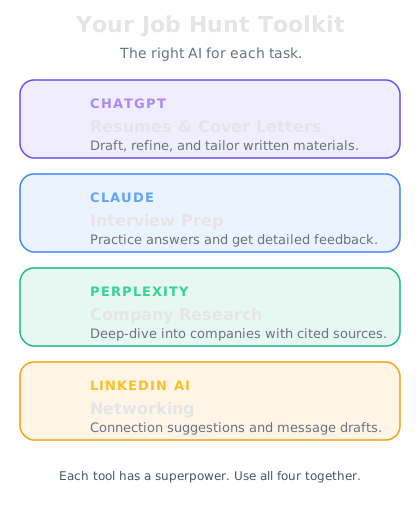
The core toolkit
ChatGPT — Your primary writing and brainstorming partner. Use it for resumes, cover letters, LinkedIn content, interview prep, and salary research. The free version works for most tasks. The paid version gives you GPT-4 and longer conversations.
Claude — Your deep analysis and editing partner. Claude excels at reviewing your resume for inconsistencies, analyzing long job descriptions, and giving honest feedback on your materials. It's particularly good at nuanced writing tasks where tone matters.
Perplexity — Your research engine. Use it for company research, salary data, industry trends, and finding information about interviewers. Unlike regular AI, Perplexity searches the web in real-time and cites its sources.
LinkedIn — Not AI-powered in the same way, but essential. Your profile is your public resume, and AI will help you optimize every section of it.
When to use which tool
Here's your cheat sheet for the next 28 days:
Resume writing and tailoring → ChatGPT or Claude. Both are excellent. ChatGPT is faster for quick drafts; Claude is better for careful editing and tone.
Cover letters → ChatGPT. It's the fastest at generating personalized letters once you give it the right context.
Company research → Perplexity. "Tell me about [company] — recent news, culture, challenges, and what they look for in hires."
Interview prep → Claude for generating questions and analyzing your answers. ChatGPT for mock interviews and rapid-fire practice.
Salary research → Perplexity for current market data. ChatGPT or Claude for negotiation strategy and scripts.
LinkedIn optimization → ChatGPT for rewriting sections. Claude for reviewing the overall narrative.
Networking messages → ChatGPT for drafting personalized outreach. Short, direct, and specific.
Setting up your workflow
Here's how to organize your job search with AI. Create a simple system:
Step 1: Create a "master document." Paste your full work history, skills, achievements, and the results from yesterday's skills assessment into one document. This is your AI briefing doc — you'll paste it at the start of every new conversation.
Step 2: Save job descriptions. Every time you find an interesting role, copy the full job description. You'll feed these to AI for resume tailoring, cover letter writing, and interview prep.
Step 3: Keep a research folder. When AI gives you company research or interview prep, save it. You'll reference it later.
Step 4: Track your applications. A simple spreadsheet: Company, Role, Date Applied, Status, Notes. Ask AI to create a template for you.
This takes 15 minutes to set up and saves you hundreds of hours over the course of your search.