Day 10 of 20 · AI for E-commerce
Social Media Content Engine
⏱ 7 min
📊 Beginner
Most store owners treat social media like a chore. Post something when you remember. Scramble for content ideas. Feel guilty when you go silent for two weeks. That cycle ends today.
You're going to build a social media content engine — a system that produces a month of content in one sitting, adapted to every platform, with AI doing the heavy lifting. By the end of this lesson, you'll know exactly what to post, where to post it, and how to keep your brand visible without spending all day creating content.
The content calendar framework
Random posting gets random results. A content calendar gives you structure, consistency, and sanity. Here's the framework that works for e-commerce:
Content pillars — Pick 4–5 recurring themes that make up your content mix:
1. Product showcases (30%) — Features, benefits, use cases, styling ideas. This is your bread and butter.
2. Behind-the-scenes (20%) — How products are made, team moments, packing orders, warehouse tours. Builds trust and connection.
3. Customer content (20%) — Reviews, photos from customers, unboxing videos, testimonials. Social proof that sells.
4. Educational (15%) — Tips, how-tos, care guides related to your products. Positions you as an expert.
5. Seasonal and trending (15%) — Holiday themes, trending audio, cultural moments. Keeps your brand relevant and timely.
Post 4–5 times per week across your main platforms. That's 20 posts per month. With AI, you can plan and draft all 20 in under an hour.
Knowledge Check
Why should you use content pillars instead of posting whatever comes to mind?
A
Pillars create a balanced mix that builds trust, showcases products, and keeps followers engaged — instead of an inconsistent, random feed
B
Social media platforms rank pillar-based content higher
C
It's required by Instagram's terms of service
D
Pillars make your feed look more aesthetically pleasing
Random posting leads to feast-or-famine content — three product shots in a row, then silence for a week, then a random meme. Pillars ensure you're consistently building trust (behind-the-scenes), proving your product works (customer content), and showing what you sell (product showcases). Followers get variety with purpose, and you never stare at a blank screen wondering what to post.
Platform-specific formats
The same product can be presented completely differently across platforms. AI helps you adapt one idea into multiple formats:
Instagram Carousels — 5–10 slides that tell a story or teach something. Work brilliantly for e-commerce: "5 ways to style our linen shirt," "The journey of your order — from warehouse to doorstep," "3 mistakes people make when buying sunscreen." Carousels get saved and shared more than single images.
Instagram Reels / TikTok — Short-form video scripts. Hook in the first 2 seconds: "Stop buying cheap candles. Here's why." Show the product in use. Keep it under 30 seconds for maximum reach. AI writes the script; you shoot it on your phone.
Pinterest Pins — Vertical images with text overlay. Pinterest users are planners — they're saving ideas for future purchases. "Summer outfit inspiration" or "Home office essentials under $50" pins drive traffic for months after posting.
Facebook Posts — Longer-form storytelling works here. Customer stories, product origin stories, sale announcements. Facebook's audience skews older and is more willing to read.
TikTok Shop — Product demonstrations with a direct "buy" button. The script matters: lead with the problem, show the solution (your product), end with a CTA. "If your kitchen sponge smells after two days, try this."
Building a month of content
Here's the step-by-step process to create 30 days of content in one focused session:
Step 1: Open a calendar template (spreadsheet or Notion) with 4–5 posts per week.
Step 2: Assign each post a content pillar. Monday = product showcase, Tuesday = educational, Wednesday = behind-the-scenes, and so on.
Step 3: Ask AI to generate content ideas for each pillar, tailored to your products and audience.
Step 4: For each post, ask AI to write the caption, hashtags, and any video script or carousel outline.
Step 5: Batch-create the visuals. Use product photos you already have, take new ones in a single shoot, or use Canva for graphics.
Step 6: Schedule everything using a tool like Later, Buffer, or the built-in platform schedulers.
The entire process — planning, writing, scheduling — takes about 2–3 hours for a full month. Compare that to the daily scramble of coming up with something on the spot.
I run an online store selling handmade soy candles. My target audience is women aged 25–40 who love cosy home aesthetics. Create a 1-week social media content plan with posts for Instagram and TikTok. Include the content pillar, post type, caption, and any video script or carousel outline. Brand voice: warm, cosy, a little whimsical.
Here's your 1-week content plan:
**MONDAY — Product Showcase (Instagram Carousel)**
Post type: 5-slide carousel
Slide 1: "The candle that turns your bathroom into a spa" (text on cosy image)
Slide 2: Product photo — Eucalyptus & Mint candle, close-up
Slide 3: Key details — 50-hour burn time, hand-poured, 100% soy
Slide 4: Customer quote: "I light this every time I take a bath. Non-negotiable." — Sarah K.
Slide 5: "Shop the Spa Collection — link in bio"
Caption: Some candles sit on a shelf. This one transforms your entire evening. Our Eucalyptus & Mint is like a deep breath you can light. 🕯️
Hashtags: #soycandles #handmadecandles #bathroomaesthetic #cosyhome #selfcare
---
**TUESDAY — Educational (Instagram Reel / TikTok)**
Post type: 15-second video
Script:
[Hook — text on screen] "You're burning your candles wrong."
[Show candle with tunnelling] "If your candle looks like this, you didn't let it pool on the first burn."
[Show proper burn — melted edge to edge] "First burn rule: let the wax melt all the way to the edges. Takes about 2 hours. This prevents tunnelling forever."
[Show perfect candle] "Your candle will thank you."
Caption: First burn = most important burn. Save this for later. 🕯️
---
**WEDNESDAY — Behind-the-Scenes (Instagram Reel / TikTok)**
Post type: 30-second video
Script:
[Hook] "POV: You ordered a candle from a small business"
[Show hands pouring wax into vessel — cosy workshop setting]
[Trimming wicks, adding labels by hand]
[Wrapping in tissue paper, adding a handwritten thank-you note]
[Sealing the box, writing the address]
[Text on screen] "Every order, made and packed with love."
Caption: No factories. No machines. Just us, a pot of wax, and a lot of love. Thank you for choosing small. 🤎
---
**THURSDAY — Customer Content (Instagram Post)**
Post type: Repost customer photo
Caption: When your customers style your candles better than you ever could. 😍 This gorgeous setup is from @[customer]. Our Fireside Vanilla looking right at home.
Tag us in your candle moments — we love sharing your spaces.
Hashtags: #candlelover #cosyvibes #customerphoto #homedecor #candleaesthetic
---
**FRIDAY — Seasonal/Trending (TikTok)**
Post type: Trending audio + product
Script:
[Use trending "that girl" or cosy aesthetic audio]
[Text] "Friday night plans:"
[Show: lighting candle, pouring tea, fluffy blanket, book, fairy lights]
[Text] "And I wouldn't change a thing."
[End card] "Shop the cosy collection — link in bio"
Caption: This is the vibe and we're not apologising. What's your Friday candle? 🕯️✨
↻ Replay conversation
Knowledge Check
What's the most efficient way to create a month of social media content for your store?
A
Repost the same product photos every week
B
Batch-plan content using AI, assign pillars to each day, write all captions at once, then schedule everything in advance
C
Post spontaneously whenever inspiration strikes
D
Hire a social media manager
Batching is the secret weapon. When you sit down once and plan the full month — using AI for ideas and captions — you enter a creative flow state that produces better content faster. Scheduling tools then post automatically. You spend 2–3 hours once instead of 30 minutes every day scrambling. And you never miss a day.
UGC prompts that get customers posting
User-generated content is free marketing from your most credible source — happy customers. But people don't create UGC unless you ask. Here's how to prompt it:
On the product insert: A small card in every order: "Love your [product]? Share a photo and tag us @[handle] for a chance to be featured — and get 15% off your next order."
Post-purchase email: "We'd love to see your [product] in action. Share a photo or video on Instagram, tag us, and we'll repost our favourites."
Branded hashtag: Create a simple hashtag like #My[BrandName]Moment and use it in every post. Customers will start using it too.
Contests: "Show us your cosy candle setup this weekend. Best photo wins a free candle set." Simple, effective, and generates a library of real customer content you can reuse.
AI can write all of these prompts, cards, and email copy in minutes. The content your customers create for you is more authentic and persuasive than anything your marketing team could produce.
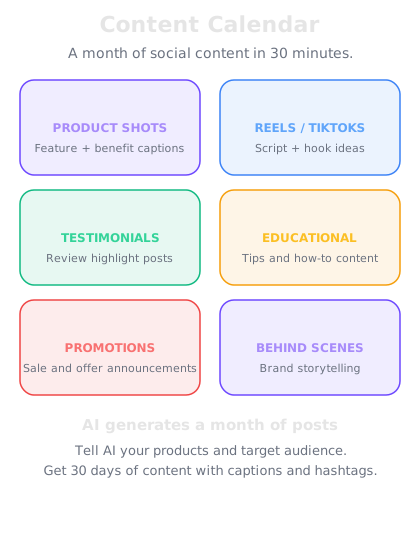
Map your content pillars to specific days. Consistency beats creativity every time.
Repurposing across platforms
One piece of content should never live on just one platform. Here's how to repurpose efficiently:
Start with video. A 30-second TikTok becomes an Instagram Reel, a YouTube Short, and a Pinterest Idea Pin.
Extract the script. That same video script becomes an Instagram carousel, a Facebook post, and a blog section.
Pull quotes. Customer testimonials from the video become standalone quote graphics for Instagram Stories and Pinterest pins.
Screenshot comments. Positive comments on your viral TikTok become social proof posts on Instagram.
One product video, shot on your phone, can generate 5–8 pieces of content across platforms. Ask AI to reformat the content for each platform — it adjusts the tone, length, and format automatically.
Knowledge Check
What's the smartest way to handle content across multiple platforms?
A
Create completely unique content for each platform from scratch
B
Focus on one platform and ignore the rest
C
Post the exact same thing everywhere with no changes
D
Create one core piece of content and ask AI to adapt it for each platform's format and audience
Creating from scratch for each platform is exhausting and unsustainable. Posting the exact same thing ignores that each platform has different formats and audiences. The sweet spot is creating one strong piece of content — a video, a story, a tip — and letting AI reformat it for each platform. A TikTok script becomes an Instagram carousel. A product video becomes a Pinterest pin. Same message, right format.
🛒
Day 10 Complete
"A content calendar with 4–5 pillars, batched monthly with AI, and repurposed across platforms turns social media from a daily chore into a growth engine that runs itself."
Tomorrow — Day 11
Customer Service at Scale
Tomorrow you'll tackle the inbox — AI-powered customer service responses that are fast, professional, and personal.